How to build native e-commerce experiences using Edge Commerce
This guide showcases how to use Edge Commerce (Product Bus) to deliver EDS-native product catalog pages and product detail pages — combining structured commerce data from any backend with the performance and authoring simplicity of Edge Delivery Services.
Availability: Edge Commerce (Product Bus) is currently available as a VIP / Co-innovation engagement. Contact your Adobe account team to learn more.
Problem
- Scale: Product catalogs can have thousands of SKUs. Authoring every product detail page (PDP) by hand in a CMS does not scale.
- Performance: Merchants want product pages that perform like any other EDS content page with all the benefits of SEO, GEO and site speed.
- Coupling: Traditional platforms tightly couple catalog storage, rendering, and the storefront — making EDS adoption difficult without a full re-platform.
Solution
Edge Commerce (Product Bus) decouples catalog storage and ETL from storefront delivery and authoring choices. Products are ingested once via a simple REST API and stored in the Product Bus. A product pipeline then renders them as EDS-native HTML pages with JSON-LD structured data — automatically generating product index JSON for category listings, XML sitemaps, and Google Merchant Center feeds.
Your front-end stays 100% EDS. Authors can enrich product pages in Document Authoring using the same blocks they use for any other page — independently of the ingestion pipeline. The commerce data layer is transparent to the authoring experience.
- Any backend: Adobe Commerce, SAP, custom PIM, spreadsheet — anything that can call a REST API
- EDS performance: Product pages served from the CDN edge, identical to any EDS content page
- Automatic outputs: HTML + JSON-LD, product index JSON, XML sitemap, Google Merchant Center feed
- Two authoring layers: Structured commerce data from ingestion + marketing enrichment authored in DA — merged at render time
- VIP/co-innovation: Currently available for VIP engagements and co-innovation partners
For the full technical architecture and API reference, see the Product Bus documentation: https://main--helix-website--adobe.aem.page/drafts/dyland/product-bus-overview
How it works: End-to-End
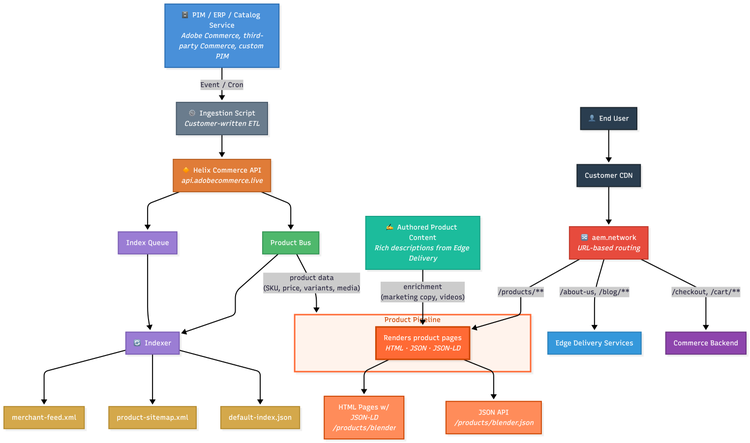
The full Edge Commerce flow connects your catalog backend to EDS delivery in three stages:
- Ingestion: A customer-written ETL script (event or cron-triggered) calls the Helix Commerce API (
api.adobecommerce.live) to PUT product data. The API validates the payload and writes it to the Product Bus (R2 storage). - Indexing: Each product write triggers the Indexer, which maintains three files per category:
default-index.json(product listing data),product-sitemap.xml, andmerchant-feed.xml. - Delivery: When a visitor opens a product URL,
aem.network(helix-mixer) routes the request to the Product Pipeline worker. The pipeline fetches structured data from the Product Bus and authored enrichment from Edge Delivery, combines them, and returns a fully rendered HTML page with JSON-LD. If a DA-authored page exists at the same path as the product, its content is merged into the rendered response — allowing authors to enrich any product page with marketing content independently of the ingestion pipeline.
End-to-End Architecture
Two Authoring Layers
Product pages combine two independent authoring layers. Authors control the marketing experience in DA without touching the ingestion pipeline — and developers control the commerce data without touching DA.
Layer 1: Core Product Data via JSON Ingestion
The description field in the Product Bus API payload is the base layer — typically developer- or ETL-authored HTML. It carries the product's factual content: specs, format, level, and what's included. EDS block classes added here decorate automatically when the page renders. On FIRE, product descriptions use:
gradient-textspan class on headings — applies the brand gradienttable no-headerdiv class — renders a clean details table (Format, Level, Pages, etc.)
To update this layer, re-submit the product payload via the ingestion script. No DA authoring or deployment needed.
Layer 2: Marketing Enrichment via Document Authoring — takes precedence
The pipeline looks for a DA-authored page at the same path as the product. If one exists, its content is merged into the rendered page on top of the ingested data. This layer takes precedence and lets authors add rich marketing content to any product — without touching the ingestion API or waiting for a data re-sync. Authoring flow:
- Open DA at the matching product path (e.g.
/products/books/etf-mastery-canadian-edition) - Add EDS blocks —
columns,tabs,teaser, FAQ sections, or any block available on the site - Preview and publish
- The pipeline picks it up automatically — no reingestion needed
On FIRE, the three enriched PDPs use: columns for feature breakdowns, tabs for course module outlines, teaser for community pull-quotes, and plain H3/paragraph sections for FAQ content.
Building Category Listing Pages
The product-grid block reads a product index JSON and renders a responsive card grid. No code required from the author.
- Open a category page in DA (e.g.
/products/books) - Add a product-grid block to the page
- In the block, link to the category index JSON (e.g.
/products/books/index.json) - Preview and publish
The block automatically fetches products, resolves images, and renders a 1→2→3 column responsive grid with hover animations matching the site design tokens.
Live Examples on FIRE
The FIRE demo site (demo.bbird.live) showcases a 3-category product catalog — all delivered via Edge Commerce. Each PDP demonstrates the two-layer authoring model. Open any PDP and use View Source to see where the pipeline-rendered data ends and the DA-authored enrichment begins.
Category listing pages (powered by the product-grid block):
Sample product detail pages (structured data + DA-authored enrichment):
- ETF Mastery: Canadian Edition — columns + teaser + FAQ
- Annual Budget Planner — columns + tabs + teaser + FAQ
- ETF Investing Masterclass — columns + tabs + teaser + FAQ
Product Ingestion API
Products are written to the Product Bus via a REST API. Minimal required payload shape:
PUT https://api.adobecommerce.live/{org}/sites/{site}/catalog/*

{
  "sku": "the-fire-playbook",
  "name": "The FIRE Playbook",
  "path": "/products/books/the-fire-playbook",
  "url": "https://demo.bbird.live/products/books/the-fire-playbook",
  "urlKey": "the-fire-playbook",
  "type": "simple",
  "availability": "InStock",
  "images": [{ "url": "https://...", "label": "Product image" }],
  "price": {
    "currency": "CAD",
    "regular": "29.99",
    "final": "29.99"
  },
  "custom": {
    "category": "Books",
    "format": "PDF + EPUB"
  }
}
The schema is strict — use the custom object for any extra product attributes not defined in the core schema. Write an ETL script in any language or runtime that can call an HTTP endpoint.
URL Routing (helix-mixer)
Configure mixerConfig in your site's /config.json to route product PDPs to the Product Pipeline and category/index pages to EDS:
{
  "patterns": {
    "/products/*/*": "pipeline-backend",
    "/products/*/index.json": "eds-backend",
    "/products/index.json": "eds-backend",
    "default": "eds-backend"
  },
  "backends": {
    "pipeline-backend": {
      "origin":
        "pipeline-cloudflare.adobecommerce.live"
    },
    "eds-backend": {
      "origin": "main--demo--scdemos.aem.live"
    }
  }
}
Longer patterns take priority. * does not cross slashes — so /products/*/* matches PDPs but not category roots or index files.
Note: For the complete API reference, schema details, image processing behavior, and multi-locale configuration, see the Product Bus documentation.