How to deliver personalized experiences with Adobe Target and Edge Delivery Services
This demo is designed for pre-sales teams showing how Adobe Target and AEP Tags (Launch) integrates with Edge Delivery Services via the aem-martech plugin using WebSDK. Authors create offers as DA fragments, marketers configure activities in Target, and personalized experiences reach visitors in milliseconds — all powered by the AEP Web SDK with zero impact on the authoring workflow or performance.
When to use this use case: Any brand that already owns Adobe Target and wants to deliver real-time personalization on their EDS site — hero personalization, audience-specific content, A/B testing at the experience level — without custom server-side logic and measure those experiences through Adobe Analytics.
Single Adobe Web SDK instance. EDS's aem-martech plugin initializes Adobe Web SDK (alloy) early in the page load. AEP Tags (Adobe Launch) is configured to detect and reuse that existing instance rather than creating its own — so there's no double-firing of events, no performance hit, and no data conflicts. Launch handles the tag management layer while EDS owns the Web SDK initialization. See the Launch container configuration in the aem-martech docs.
Access note: This demo environment requires view access to Adobe Target, AEP, and Adobe Analytics. If you need access to explore the configuration, reach out to Adobe Engineering on Slack or Microsoft Teams.
Demo environment
This demo uses the aem-martech plugin, already instrumented in the project codebase. Solution Consultants only need to configure activities in Adobe Target and preview results on the .aem.page environment.
plugins/martech/ in the repoassets.adobedtm.com embed in scripts.jsKey value propositions to call out early:
- No flicker: Personalization resolves before first paint via eager loading
- Fragment-based offers: Authors own the content, marketers own the targeting
- Web SDK unification: Single edge call for Target + Analytics + Identity
- Target-native audiences: New vs. Returning, Geo, Traffic Source — no RT-CDP required for basic targeting
Part 1: Form-Based Activity — Hero A/B Test
What to emphasize
- Authors create hero variants as DA fragments — they never touch Target
- Marketers pick the fragment as an offer in Target and configure the traffic split
- The
homepage-hero-mboxdecision scope is requested at page load - 50/50 split runs automatically — no URL parameters, no cookies to manage
- This pattern works for any "swap a section" personalization
Steps
- Show the live homepage — point out the current hero ("The Science of Wealth Preservation"). This is the control experience.
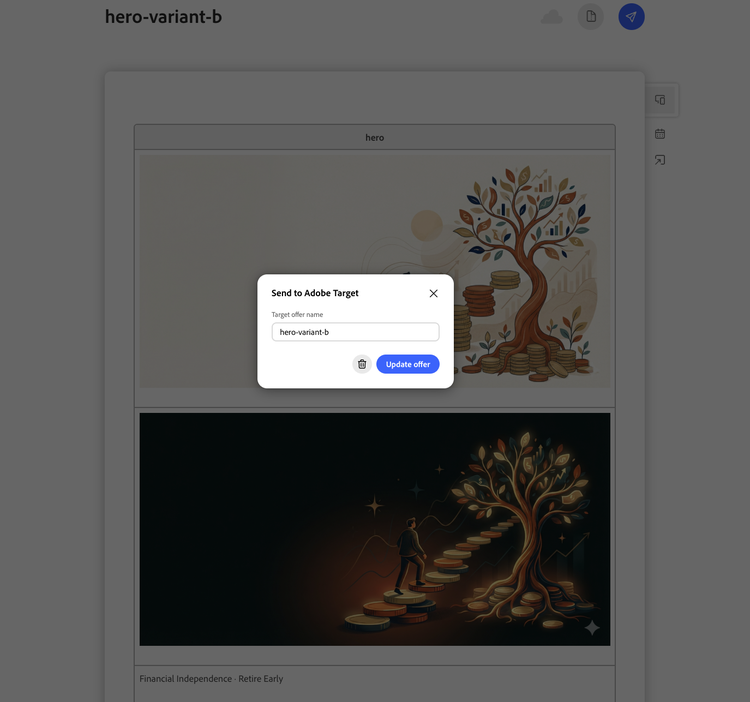
- Open the variant fragment in DA — show the hero-variant-b fragment in DA — different headline ("Your Blueprint for Financial Independence") and a softer CTA.
- Show the "Send to Target" flow — DA → Prepare → Send to Adobe Target → offer appears in Target as an HTML offer.
- Open Target → Activity — show the Form-Based Composer: mbox =
homepage-hero-mbox, Experiences A (control) / B (variant), 50/50 split. - Activate and preview Variant B — hero swaps to "Your Blueprint for Financial Independence."
- Key talking point: The author created the content. The marketer wired the targeting. No developer involved for the live activity.
Part 2: Form-Based XT — Teaser Personalization by Audience
What to emphasize
- Experience Targeting (XT) delivers different content per audience — not random like A/B
- Uses Target-native "New Visitors" audience — no RT-CDP or AEP datasets required
- Authors create the teaser fragment; marketers assign it to the audience in Target
- Multiple audiences are prioritized (first match wins)
Steps
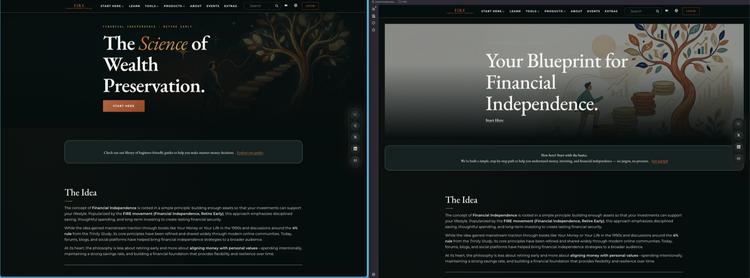
- Show the default teaser on homepage — "Check out our library of beginner-friendly guides..." This is what returning visitors see.
- Open the new-visitor teaser fragment in DA — fragments/offers/learn-home-teaser — "New here? Start with the basics."
- Open Target → Homepage Teaser XT — show the XT flow: Experience B (New Visitors) → new teaser offer, Experience A (All Visitors) → default.
- Preview the New Visitors experience — teaser swaps to the beginner-focused message.
- Key talking point: One line of metadata (
target: on) on the page is all it takes. The plugin handles the rest — fetch, decide, render.
Part 3: VEC Activity — Page-Level Audience Targeting
What to emphasize
- Visual Experience Composer (VEC) — marketers make changes directly in the Target UI without touching code or DA
- Ideal for quick copy tweaks, headline tests, and seasonal messaging
- Changes are delivered as DOM actions — no fragments needed
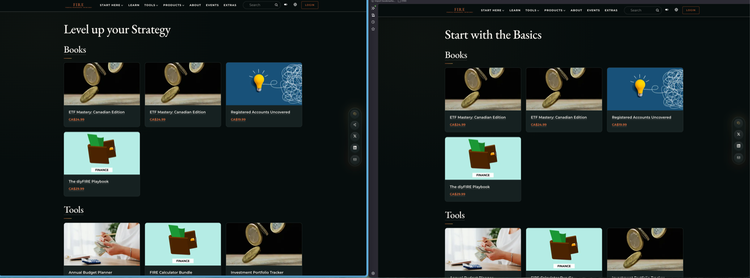
- Audience targeting: New Visitors, Returning Visitors, All Visitors — each sees a different h1 on the Products page
Steps
-
Show the products page — default h1 says "All Products." This is the fallback experience for All Visitors.
-
Open Target → Products Page VEC activity — show 3 experiences with h1 changes made entirely inside the Target VEC.
-
Walk through each experience:
- New Visitors → "Start with the Basics"
- Returning Visitors → "Level up your Strategy"
- All Visitors (fallback) → "All Products"
-
Preview each experience in Target — show the h1 swapping per audience segment.
-
Key talking point: The marketer made these headline changes entirely inside Target. No code deploy needed. When the activity ends, the original content returns automatically.
Part 4: Analytics & Measurement
What to emphasize
- Single Web SDK call sends data to both Target AND Analytics — no dual-tagging
- Adobe Tags (Launch) provides rule-based analytics for custom events (CTA clicks, product card clicks)
- Page views flow automatically to Analytics via the datastream
- A4T is available as an upgrade path (enhancement) — switch the reporting source in any activity to unify experiment data in Analytics Workspace
- Real-time debugging via AEP Debugger extension
Steps
- Show the network call — open DevTools → Network → filter
interact→ show the single edge call that returns Target decisions AND sends the page view to Analytics. - Open AEP Debugger (if installed) — show Target tab (propositions returned) + Analytics tab (page view hit confirmed).
- Show Analytics Workspace — open the project, show Page Views by Page dimension → hits from
demo.bbird.liveare landing. - Key talking point: One integration, one edge call — Target gets personalization decisions, Analytics gets behavioral data. Each solution reports independently with no conflicts.
Part 5: Performance — No Lighthouse Regression
What to emphasize
- The #1 objection to personalization: "it will kill my page speed scores"
- aem-martech plugin uses eager loading — personalization resolves in parallel with first section render
- No render-blocking scripts, no layout shift from late content swap
- Lighthouse scores stay at 100 on both personalized pages
- Deep PSI tool shows side-by-side proof
Steps
- Open the Deep PSI tool — Deep PSI comparison
- Show both pages scoring 100 — overall Performance score unchanged after integrating Target.
- Call out the architecture reason — the plugin fires alloy in
loadEagerinside aPromise.allalongside section rendering. If Target responds within 1s, content is swapped before first paint. If it doesn't, the page renders default content (graceful timeout). - Key talking point: "We added real-time personalization — three active Target activities — and the Lighthouse score didn't move. That's the benefit of the aem-martech architecture: performance and personalization aren't tradeoffs."
How it all fits together
The aem-martech plugin ties all three activity types into a single, lightweight architecture:
Page load (demo.bbird.live)
  └─ aem-martech plugin
       ├─ alloy.js → Edge Network → Target (personalization decisions)
       ├─ alloy.js → Edge Network → Analytics (page view)
       └─ Adobe Tags → ACDL rules → custom events (clicks, conversions)