How to showcase Site Login flow in Edge Delivery Services
This demo video showcases how you could demonstrate site login flow in Edge Delivery Services in the Demo site.
Demo
This demo takes you through a journey from end users :
- Navigate to https://demo.bbird.live/
- Use Login button in the navigation header
- Redirects to login page
- Enter Adobe Email Address to receive a OTP (One time password) to login
- On successful login, You are redirected back to https://demo.bbird.live/
- You can hove over to showcase logged in state for current user
Demo Script
- We integrated the demo site with Cloudflare Zero Trust using a very small auth worker.
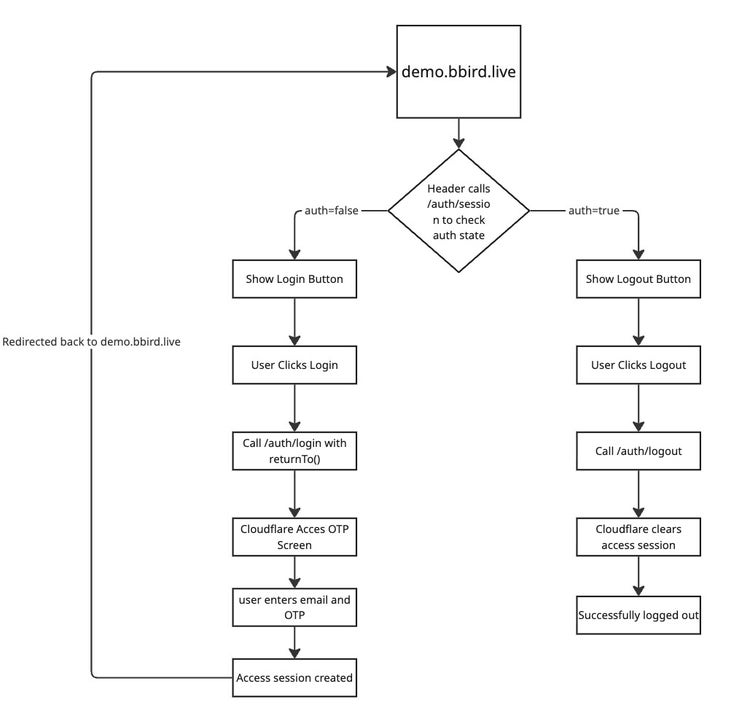
- The header is session-driven: it calls /auth/session and shows Login or Logout based on real auth state.
- Login redirects to Cloudflare Access OTP, and on success returns users back to the site.
- Access policy enforces enterprise rules (for this demo: only @adobe.com emails).
- Logout clears the Access session, and the next session check flips the header back to Login.
- This gives us a production-like identity flow without building a custom auth backend, while keeping the code simple and extensible.
Note : More Details on Cloudflare worker, See here
Login Flow Details