How to generate dynamic event pages from JSON using JSON2HTML
This demo showcases how structured JSON can be turned into fully rendered pages using JSON2HTML with Adobe Edge Delivery Services.
Instead of manually authoring every event page, this approach uses a shared JSON feed, a JSON2HTML configuration, and a reusable Mustache template to generate detail pages dynamically. The same pattern can be reused across finance, retail, healthcare, education, and other industries wherever many pages share the same structure.
Why This Matters
The challenge: You need to create many event pages for your site — each page has the same structure but different data. Data is only available in an external API.
The solution: Use the JSON2HTML worker as a page generation engine — one JSON data source + Mustache templates = unlimited pages. In this exercise, the entire pipeline is pre-configured. You'll explore how it works and then prove it's dynamic by adding new events.
Why use JSON2HTML:
- Zero manual authoring - Worker generates pages from data automatically
- Two templates, unlimited pages - List view + detail view from one data source
- Branch-aware - Test on your branch before production
- Easy maintenance - Update template once → all pages update
- Scalable - 6 events or 600, same template
- SEO Friendly : Available in your index to optimize your sitemaps.
Real-world use cases:
- Event series across multiple cities (list + individual event pages)
- Product catalog with browse page + product detail pages
- Speaker/author directory with grid listing + individual profiles
- Store locator with map/list view + individual store pages
How it works
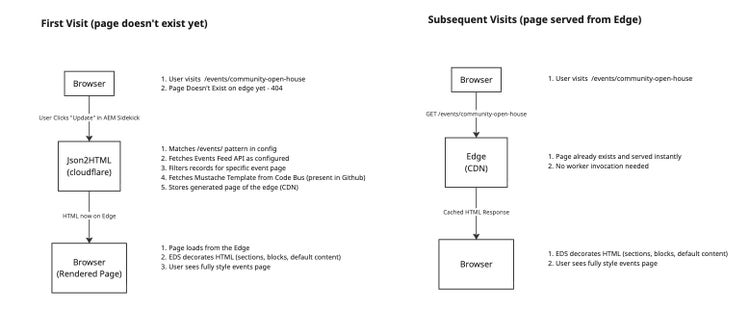
This demo uses JSON2HTML to match incoming page requests to records in a JSON feed and render the matching record through a Mustache template.
When a visitor opens an event page such as /events/community-open-house, JSON2HTML fetches the JSON endpoint, matches the event from Event Feed API, and renders the page using the configured Mustache template.
Because the content is data-driven, new event pages can be created by adding new records to the JSON feed without manually authoring each page.
As these pages are dynamically generated using Events API and Mustache Template, they don't exist in Document Authoring and served directly from the Content Bus.
Key Insight : The JSON2HTML worker is a page generation engine, not a runtime proxy. It generates HTML once, stores it on the edge, and subsequent visits are served directly from the CDN — just like any other EDS page. Use "Update" from the Sidekick to regenerate pages when data or templates change.
Note : You can always automate the page generation process using AEM Admin API (Preview/Publish) that can auto-generate new pages as they are available/updated in the backing Feed API. [Not covered in this Demo]
For more details on JSON2HTML, See reference documentation: https://www.aem.live/developer/json2html
Examples
Events landing page: https://demo.bbird.live/events
Sample event pages:
- https://demo.bbird.live/events/community-open-house
- https://demo.bbird.live/events/online-information-session
Raw JSON feed (External) : https://scdemo-upcoming-events.aem-poc-lab.workers.dev/
Events Template (Mustache): See https://github.com/scdemos/demo/blob/main/templates/events/events.html
Demo Exercise : Test Templates in JSON2HTML Simulator
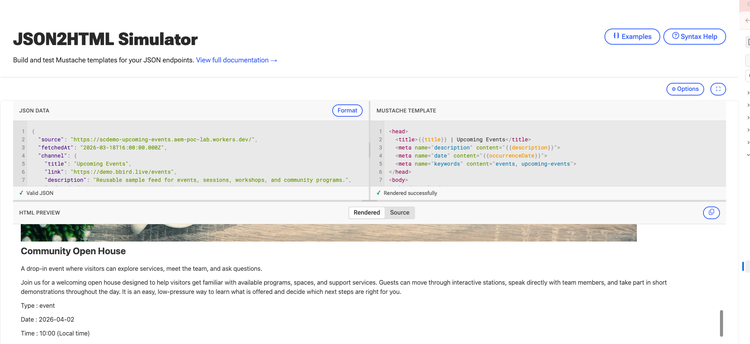
Try the JSON2HTML Simulator to see exactly how templates are rendered.
Open: https://tools.aem.live/tools/json2html-simulator/
Test the Events Template:
-
JSON Data (left panel):
- Open https://scdemo-upcoming-events.aem-poc-lab.workers.dev/ in browser
- Copy the entire JSON response and paste into the panel
-
Simulator Options (click ⚙ Options):
- arrayKey:
data - pathKey:
path - testPath:
/events/community-open-house
- arrayKey:
-
Mustache Template (middle panel):
- Paste the events template content from https://github.com/scdemos/demo/blob/main/templates/events/events.html
-
Click "Render" or press
Cmd+Enter
You should see: Fully rendered HTML for a Events page that is ready to be generated.
Configuration Snippets
Content Overlay
{
    "source": {
        "url": "https://content.da.live/scdemos/demo/",
        "type": "markup"
    },
    "overlay": {
        "url": "https://json2html.adobeaem.workers.dev/scdemos/demo/main",
        "type": "markup"
    },
    "contentBusId": "df1d8a06bef2d4e2cffb6718702890da0ccf04053a9e9580349d7"
}
JSON2HTML Configuration
[
  {
    "path": "/events/",
    "endpoint": "https://scdemo-upcoming-events.aem-poc-lab.workers.dev/",
    "regex": "/[^/]+$/",
    "arrayKey": "data",
    "pathKey": "path",
    "template": "/templates/events/events.html"
  }
]