How to showcase gated content experiences in Edge Delivery Services and Document Authoring
This demo video showcases how to demonstrate gated content experiences in Edge Delivery Services and Document Authoring
Problem
- End users: Logged-in users see premium content; anonymous users see public content only.
- Authors: Need an easy, intuitive way to author gated content in DA.
- Exposure risk: If protection is only client-side, Premium content can be scraped or read by inspecting HTML markup
Solution
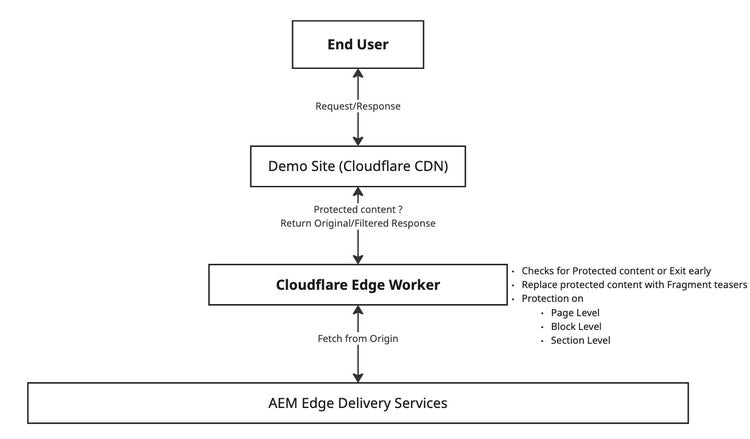
Relying on the browser alone to “hide” premium content is not enough for real enforcement—the delivery path must respect authentication and serve appropriate markup for each audience.
A practical approach combines edge-side logic (close to the user, with the help of CDN edge workers) with author-friendly controls in the authoring experience. This is already an established pattern when working with AEM Edge Delivery Services. You can read more about it here
For Content Authors
- Simple metadata: Turn protection on using familiar page/section level metadata.
- Flexible control: Scope protection at the level you need—section, or block—so one experience can mix public and gated pieces.
- Preview: Using Custom DA Controls, See how anonymous and signed-in experiences differ before publish
Authoring Flow
-
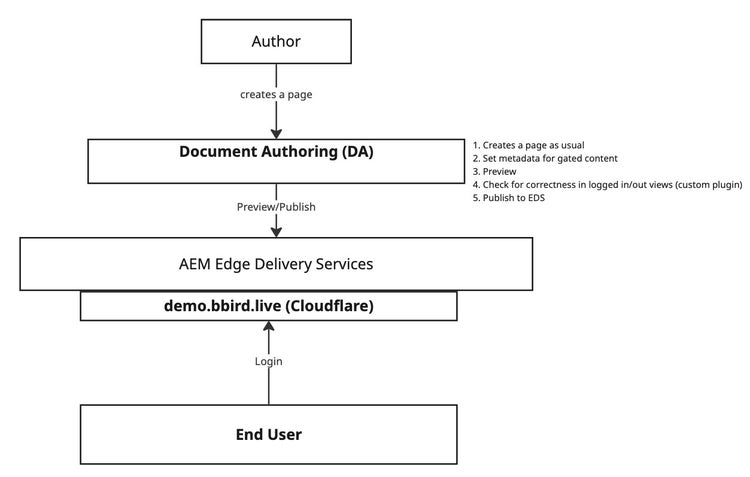
Create a page
-
Set page metadata
gated = trueto mark the page has premium content -
For any section
- add section property
view=logged-inorview=logged-outto reflect the audience of the content - If you don't add the
viewproperty, section is considered as public
- add section property
-
For any block
- Add variant class as
logged-inorlogged-outto reflect the audience of the content - If you don't add
logged-inorlogged-outclass variant, the block is considered as public
- Add variant class as
-
Once ready, Preview the page
-
Use custom DA authoring controls to toggle between anonymous and authenticated content before publishing
-
Once ready, Publish your page
For End Users
- Personalized experience: Content reflects whether they are signed in or browsing anonymously.
- Progressive disclosure: Public teasers can show value before asking for login.
- Seamless fit: Feels like part of the existing site—not a separate “gated app.”
Delivery Flow
- Navigate to sample gated page : https://demo.bbird.live/already-investing
- Observe you should be seeing anonymous/public content for the page
- Login in your site
- Observe you should be seeing premium content for the page along with any specific public content as authored